Getting Started
Prerequisites
- Terraform >= 1.5
- AWS account with permissions for EC2, ALB, Cognito, EFS, Secrets Manager, CloudWatch, Route53, and Bedrock
- VPC with public subnets (for ALB) and private subnets (for EC2)
- Route53 hosted zone for DNS and ACM certificate validation
- InfraHouse Pro AMI available in your account (owner
303467602807)
First Deployment
1. Add the module
module "openclaw" {
  source  = "registry.infrahouse.com/infrahouse/openclaw/aws"
  version = "0.5.0"
  providers = {
    aws     = aws
    aws.dns = aws
  }

  environment        = "production"
  zone_id            = aws_route53_zone.example.zone_id
  alb_subnet_ids     = module.network.subnet_public_ids
  backend_subnet_ids = module.network.subnet_private_ids
  alarm_emails       = ["ops@example.com"]

  cognito_users = [
    {
      email     = "admin@example.com"
      full_name = "Admin User"
    },
  ]
}
2. Apply
The first apply takes ~10 minutes while cloud-init installs packages, mounts EFS, installs OpenClaw via npm, and pulls the default Ollama model.
The module works immediately after apply. AWS Bedrock (Amazon Nova 2 Lite) is the default LLM provider — it uses IAM credentials from the instance role, so no API keys are needed.
3. Log in
Each user listed in cognito_users will receive an email invitation with a temporary password:
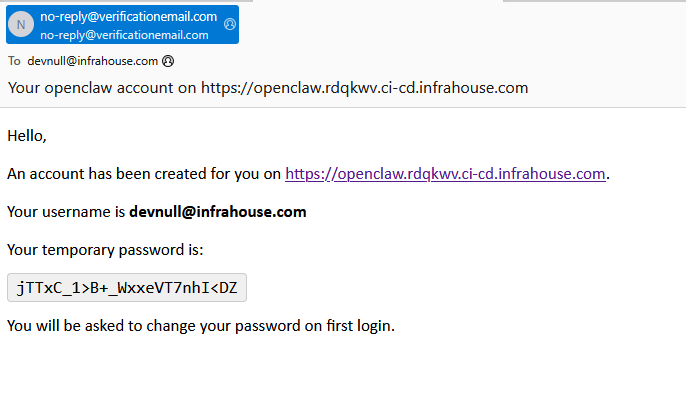
Open the dashboard URL (e.g. https://openclaw.infrahouse.com/) — Cognito will redirect to the hosted login page. After signing in with the temporary password you will be prompted to set a permanent one.
You can start using OpenClaw right away with the default Bedrock models.
4. (Optional) Add secrets
The module creates a Secrets Manager secret for passing environment variables to OpenClaw. Every key/value pair in the secret JSON becomes available to the OpenClaw process. Common uses include LLM API keys, Telegram bot tokens, and any secrets needed by skills or tools.
First, grant write access by adding api_keys_writers to your module block:
Then populate the secret with a JSON file:
This step is entirely optional — Bedrock provides full LLM functionality without any external secrets.
Bedrock First-Time Setup
Bedrock models may require a one-time AWS Marketplace subscription on first use. See the FAQ for details. Amazon Nova models typically work without any extra setup.
Two-Provider Configuration
If your Route53 zone is in a different AWS account, configure separate providers:
provider "aws" {
  region = "us-west-2"
}

provider "aws" {
  alias  = "dns"
  region = "us-east-1"
  assume_role {
    role_arn = "arn:aws:iam::ACCOUNT_ID:role/route53-admin"
  }
}

module "openclaw" {
  source  = "registry.infrahouse.com/infrahouse/openclaw/aws"
  version = "0.5.0"
  providers = {
    aws     = aws
    aws.dns = aws.dns
  }
  # ...
}