Architecture
This document explains how the InfraHouse Terraformer module works.
Overview
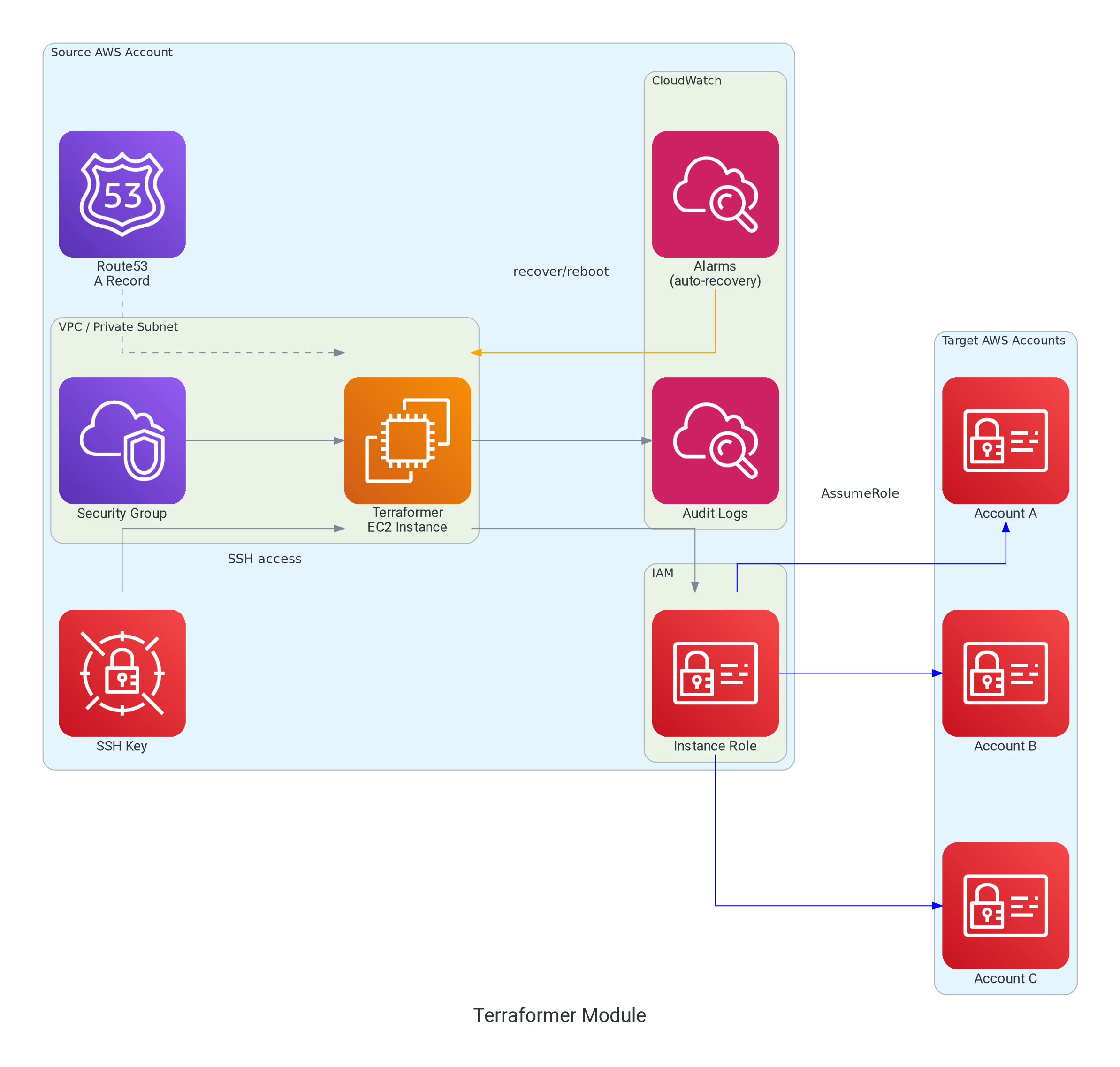
The module deploys a single EC2 instance with:
- Auto-recovery capabilities
- CloudWatch monitoring
- Puppet-based configuration
- IAM permissions for AssumeRole operations
Components
EC2 Instance
The terraformer instance is built on:
- AMI: Ubuntu Pro (latest LTS) with security hardening
- Instance Profile: IAM role with AssumeRole permissions
- Metadata: IMDSv2 enforced for security
- Root Volume: Customizable size (minimum 8GB)
- User Data: Cloud-init configuration generated by
infrahouse/cloud-init/awsmodule
Puppet Bootstrap
The terraformer instance is automatically configured using Puppet, with all components provided out of the box from InfraHouse's public APT repository. No manual Puppet setup is required.
How It Works
The infrahouse/cloud-init/aws module generates cloud-init userdata that bootstraps the instance with a complete Puppet environment:
1. Cloud-init executes on first boot
         │
         ▼
2. Configure AWS CLI and region
         │
         ▼
3. Establish Puppet context via facts
   - Set environment (production, dev, etc.)
   - Set CloudWatch log group and namespace
   - Set custom facts from module variables
         │
         ▼
4. Add InfraHouse APT repository
   - Public repository: apt.infrahouse.com
   - Contains Puppet code and tooling
         │
         ▼
5. Install bootstrap packages
   - puppet-code: Puppet manifests, roles, profiles
   - infrahouse-toolkit: ih-puppet wrapper script
         │
         ▼
6. Execute ih-puppet wrapper
   - Applies Puppet manifests from puppet-code package
   - Uses facts set in step 3
   - Configures instance per terraformer role
         │
         ▼
7. Create completion marker
   - /var/run/puppet-done indicates bootstrap finished
         │
         ▼
8. Instance ready with:
   - Terraform installed (from Hashicorp APT repo)
   - AWS CLI configured
   - CloudWatch agent installed and configured
   - System hardening applied
   - User accounts provisioned
What You Get Automatically
The terraformer instance comes fully configured with:
- Terraform: Latest version from Hashicorp APT repository
- AWS CLI: Pre-configured with instance region
- CloudWatch Agent: Configured to send logs and metrics
- Terraformer Role: Puppet role specifically for administrative operations
- System Hardening: Security configurations per best practices
- User Management: Automated user provisioning via Puppet
Puppet Code Source
All Puppet code is open source and maintained by InfraHouse:
- Repository: github.com/infrahouse/puppet-code
- APT Package:
puppet-codefromapt.infrahouse.com - Roles:
role::terraformerprovides the complete configuration - Profiles: Modular components (AWS CLI, Terraform, CloudWatch)
Customization
You can customize the Puppet configuration via module variables:
module "terraformer" {
  # ...

  # Puppet environment (maps to puppet-code branch/environment)
  environment = "production"

  # Custom facts passed to Puppet
  puppet_custom_facts = {
    datacenter = "us-west-2a"
    tier       = "admin"
  }

  # Enable debug logging for troubleshooting
  puppet_debug_logging = true
}
These variables are passed as Puppet facts, which the role::terraformer uses to make configuration decisions.
Verifying Puppet Bootstrap
To verify Puppet completed successfully:
# Check marker file exists
test -f /var/run/puppet-done && echo "Puppet completed" || echo "Still running"

# View Puppet facts
sudo facter -p | grep -E '(puppet|terraformer)'

# Check installed packages
dpkg -l | grep -E '(puppet-code|infrahouse-toolkit)'

# View Puppet-installed software
terraform version
aws --version
Security Group
Ingress rules:
- SSH (port 22): From VPC CIDR only
- ICMP: From VPC CIDR only (restricted, not 0.0.0.0/0)
Egress rules:
- All traffic: Allowed (for accessing AWS APIs, Puppet, package repositories)
Route53 DNS Record
- Type: A record
- Name: Configurable (default:
terraformer) - TTL: 300 seconds
- Value: Instance private IP
CloudWatch Components
Log Group
- Name:
/aws/ec2/terraformer - Retention: Configurable (default: 365 days, ISO compliant)
- Purpose: Audit trail for all operations
Auto-Recovery Alarms
- System Status Check (
StatusCheckFailed_System) - Monitors hardware health
- Action:
ec2:recover -
Threshold: 2 consecutive failures
-
Instance Status Check (
StatusCheckFailed_Instance) - Monitors software health (kernel panics, OOM)
- Action:
ec2:reboot - Threshold: 3 consecutive failures
CPU Utilization Alarm (Optional)
- Monitors CPU usage
- Triggers SNS notification when > 90%
- Only created if
sns_topic_alarm_arnprovided
IAM Permissions
Instance Profile Permissions
Base permissions granted to the instance:
{
  "Version": "2012-10-17",
  "Statement": [
    {
      "Effect": "Allow",
      "Action": [
        "sts:AssumeRole",
        "iam:GetRole"
      ],
      "Resource": "*"
    },
    {
      "Effect": "Allow",
      "Action": [
        "logs:CreateLogStream",
        "logs:PutLogEvents",
        "logs:DescribeLogGroups",
        "logs:DescribeLogStreams"
      ],
      "Resource": "arn:aws:logs:*:*:log-group:/aws/ec2/terraformer:*"
    },
    {
      "Effect": "Allow",
      "Action": "cloudwatch:PutMetricData",
      "Resource": "*",
      "Condition": {
        "StringEquals": {
          "cloudwatch:namespace": "terraformer"
        }
      }
    }
  ]
}
Additional permissions can be added via extra_instance_profile_permissions variable.
SSH Key Management
Two options:
- TLS Private Key generated by Terraform
- Public Key uploaded to AWS as Key Pair
- Private Key stored in Secrets Manager
- Rotation every 90 days (configurable)
Resources:
Instance Lifecycle
Launch Sequence
1. Terraform apply
         │
         ▼
2. EC2 instance launches
   - Attach IAM instance profile
   - Configure metadata options (IMDSv2)
   - Apply security group
   - Attach to subnet
         │
         ▼
3. Cloud-init executes (user data)
   - Install packages (make, python, git)
   - Add Hashicorp APT repository
   - Configure Puppet facts
   - Run Puppet agent
   - Create /var/run/puppet-done marker
         │
         ▼
4. Puppet configures instance
   - Install Terraform
   - Install AWS CLI
   - Configure CloudWatch agent
   - Set up user accounts
   - Configure monitoring
         │
         ▼
5. CloudWatch alarms activate
   - System status check monitoring
   - Instance status check monitoring
         │
         ▼
6. Instance ready for operations
Auto-Recovery Scenarios
Hardware Failure (System Status Check Failed)
1. AWS detects hardware issue
   (host degradation, network path failure)
         │
         ▼
2. System status check fails for 2 minutes
         │
         ▼
3. CloudWatch alarm enters ALARM state
         │
         ▼
4. Auto-recovery action triggered
   - Instance migrated to healthy hardware
   - Same instance ID, IP, volumes
   - Minimal downtime (~2-3 minutes)
         │
         ▼
5. Instance resumes operation
Software Failure (Instance Status Check Failed)
1. Kernel panic or out-of-memory condition
         │
         ▼
2. Instance status check fails for 3 minutes
         │
         ▼
3. CloudWatch alarm enters ALARM state
         │
         ▼
4. Auto-reboot action triggered
   - Graceful shutdown
   - System reboot
   - Downtime ~2-5 minutes
         │
         ▼
5. Instance recovers
   - Cloud-init runs again
   - Puppet re-configures
   - Services restart
SSH Key Rotation
1. time_rotating.ssh_key_rotation reaches rotation_days
         │
         ▼
2. time_static triggers replacement
         │
         ▼
3. New tls_private_key generated
   (create_before_destroy)
         │
         ▼
4. New aws_key_pair created
   (create_before_destroy)
         │
         ▼
5. New key stored in Secrets Manager
         │
         ▼
6. Instance replacement triggered
   (null_resource.terraformer userdata change)
         │
         ▼
7. Old instance terminated
8. New instance launched with new key
Security Model
Network Isolation
- Instance in private subnet only
- No direct internet access (uses NAT gateway)
- SSH only from VPC CIDR
- ICMP only from VPC CIDR
IAM Least Privilege
- Base permissions: AssumeRole + CloudWatch Logs/Metrics
- No direct AWS service permissions
- Access via AssumeRole to other accounts
- Trust policies control what can be assumed
SSH Key Security
- Private keys never stored in Terraform state (when user-provided)
- Auto-generated keys rotated regularly
- Keys stored in Secrets Manager with IAM controls
- Access controlled via
ssh_key_readersvariable
Audit Trail
- All operations logged to CloudWatch Logs
- 365-day retention (ISO compliant)
- Integrated with AWS CloudTrail for API calls
- Puppet changes logged via Puppet reports