Architecture
This document explains how the terraform-aws-website-pod module works and the resources it creates.
High-Level Architecture
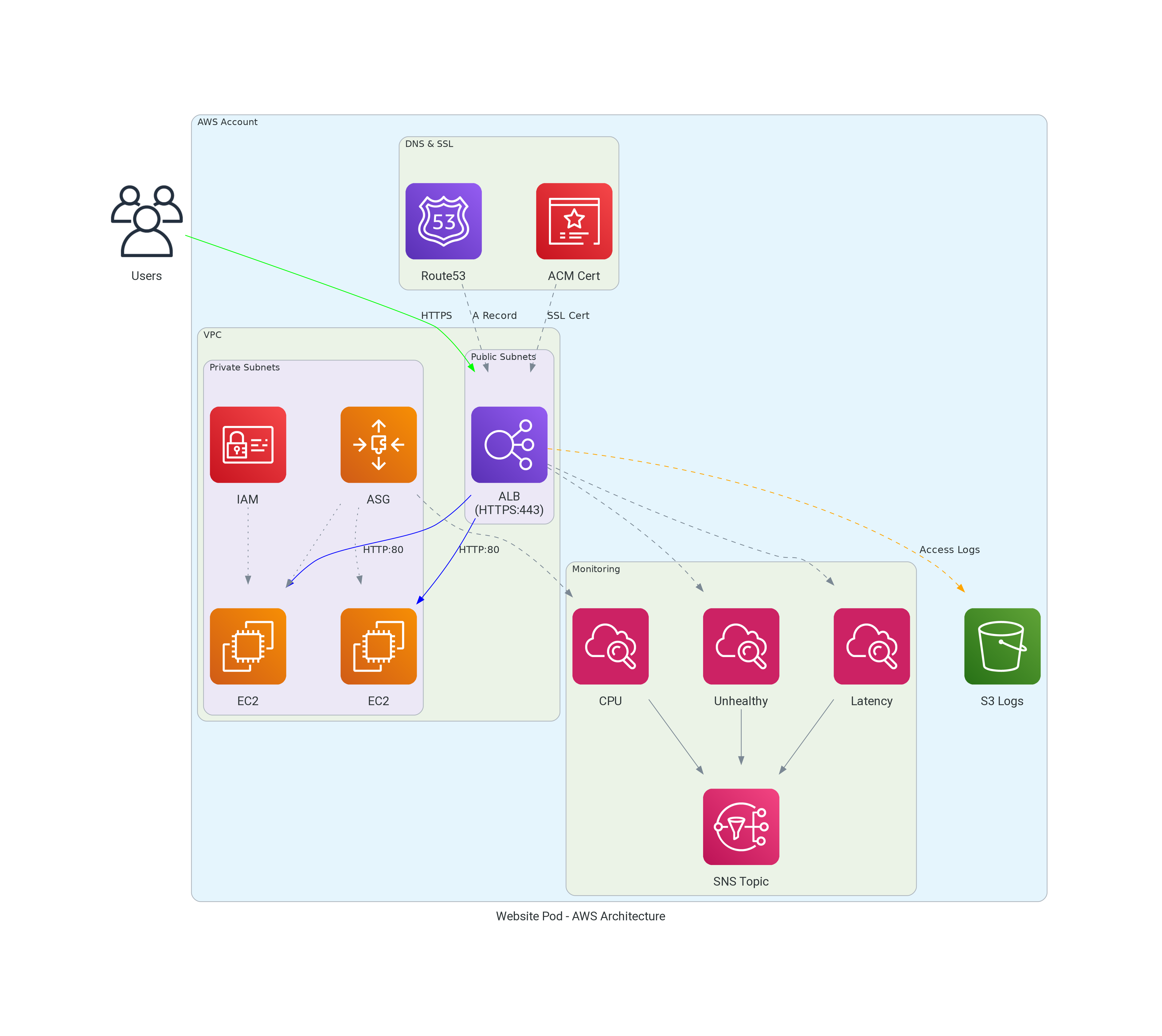
Resource Overview
Application Load Balancer (ALB)
The module creates an internet-facing Application Load Balancer that:
- Listens on port 443 (HTTPS) with the ACM certificate
- Listens on port 80 (HTTP) and redirects to HTTPS
- Performs health checks against backend instances
- Optionally logs access requests to S3
Key configurations: - userdata - A cloud-init script that provisions the EC2 instance and starts your HTTP server - subnets - Subnet IDs where the ALB is deployed (typically public subnets for internet-facing applications) - backend_subnets - Subnet IDs where EC2 instances run (typically private subnets for security) - zone_id and dns_a_records - Route53 hosted zone and DNS names that will resolve to the ALB - alb_healthcheck_path - URL path the ALB uses to verify backend instances are healthy
Auto Scaling Group (ASG)
The ASG manages EC2 instances and:
- Maintains minimum/maximum instance counts
- Scales based on CPU utilization (target tracking)
- Supports instance refresh for zero-downtime deployments
- Optionally uses spot instances for cost savings
Key configurations: - asg_min_size / asg_max_size - Instance count limits - autoscaling_target_cpu_load - Target CPU for scaling (default: 60%) - on_demand_base_capacity - Minimum on-demand instances (rest are spot) - max_instance_lifetime_days - Force instance rotation
ACM Certificate
The module automatically:
- Requests an ACM certificate for your domain
- Creates DNS validation records in Route53
- Waits for certificate validation
- Attaches the certificate to the ALB
The certificate covers all DNS names specified in dns_a_records.
Security Groups
Two security groups are created:
ALB Security Group
| Direction | Port | Source | Purpose |
|---|---|---|---|
| Ingress | 443 | alb_ingress_cidr_blocks | HTTPS traffic |
| Ingress | 80 | alb_ingress_cidr_blocks | HTTP (redirects to HTTPS) |
| Ingress | ICMP | 0.0.0.0/0 | Ping/diagnostics |
| Egress | All | 0.0.0.0/0 | Outbound traffic |
Backend Security Group
| Direction | Port | Source | Purpose |
|---|---|---|---|
| Ingress | target_group_port | ALB SG | Application traffic |
| Ingress | target_group_port | ALB SG | Health checks |
| Ingress | 22 | VPC CIDR | SSH from VPC |
| Ingress | 22 | ssh_cidr_block | SSH from allowed ranges |
| Ingress | ICMP | 0.0.0.0/0 | Ping/diagnostics |
| Egress | All | 0.0.0.0/0 | Outbound traffic |
DNS Records
The module creates in Route53:
- A Records - Alias records pointing to the ALB for each name in
dns_a_records - CAA Records - Certificate Authority Authorization records restricting which CAs can issue certificates
- Certificate Validation Records - CNAME records for ACM DNS validation
CloudWatch Alarms
When alarm_emails is configured, the module creates:
| Alarm | Metric | Purpose |
|---|---|---|
| Unhealthy Host Count | UnHealthyHostCount | Alert when instances fail health checks |
| Target Response Time | TargetResponseTime | Alert on high latency |
| Low Success Rate | HTTP 5xx errors | Alert when error rate exceeds threshold |
| CPU Utilization | CPUUtilization | Alert when autoscaling can't keep up |
Access Log Querying (Athena)
When alb_access_log_athena_enabled is true (and access logging is enabled), the module creates:
| Resource | Purpose |
|---|---|
| Glue Catalog Database | Metadata database named <service_name>_<random_suffix> |
| Glue Catalog Table | Table schema mapping RegexSerDe over ALB log files in S3 |
| Athena Workgroup | Pre-configured workgroup with encrypted results output |
| S3 Results Bucket | Stores query results with 30-day lifecycle expiry |
The Glue table uses RegexSerDe to parse the ALB access log format into 33 typed columns (type, time, elb, client_ip, client_port, target_ip, etc.). Athena reads the log files directly from S3 — no ETL pipeline or data copying required.
Request Flow
- User requests
https://example.com - DNS resolves to ALB IP address
- ALB terminates SSL using ACM certificate
- ALB routes request to healthy backend instance
- If stickiness enabled, subsequent requests go to same instance
- Backend processes request and returns response
- ALB forwards response to user
Scaling Behavior
The Auto Scaling Group uses target tracking to maintain CPU utilization:
- CPU < Target (60%): System is stable, no scaling action
- CPU > Target (60%): ASG launches new instances (takes ~5-10 minutes)
- CPU > Alarm Threshold (90%): If CPU stays high after scaling, alarm triggers
Default thresholds: - Target CPU: 60% (ASG adds instances) - Alarm threshold: 90% (alerts that scaling isn't keeping up)
High Availability
The module achieves high availability through:
- Multi-AZ deployment - ALB and instances span multiple availability zones
- Health checks - Unhealthy instances are replaced automatically
- Instance refresh - Zero-downtime updates via rolling deployments
- Lifecycle hooks - Graceful instance launch and termination
Cost Optimization
Spot Instances
Enable spot instances to reduce costs:
This maintains availability with at least one on-demand instance while using spot for additional capacity.
Right-sizing
- Use
instance_typeappropriate for your workload - Set
asg_max_sizeto limit maximum spend - Enable ALB access logging to analyze traffic patterns